Headless CMS: Solusi Modern untuk Manajemen Konten di 2026
Pendahuluan
Di era digital yang semakin dinamis, cara kita mengelola dan mendistribusikan konten telah berevolusi secara signifikan. Traditional CMS seperti WordPress telah melayani kita dengan baik selama bertahun-tahun, namun tuntutan modern untuk multi-channel delivery dan developer experience yang lebih baik telah melahirkan pendekatan baru: Headless CMS.
Artikel ini akan membahas secara mendalam tentang Headless CMS, perbandingan platform populer, dan panduan kapan sebaiknya menggunakannya.
Apa Itu Headless CMS?
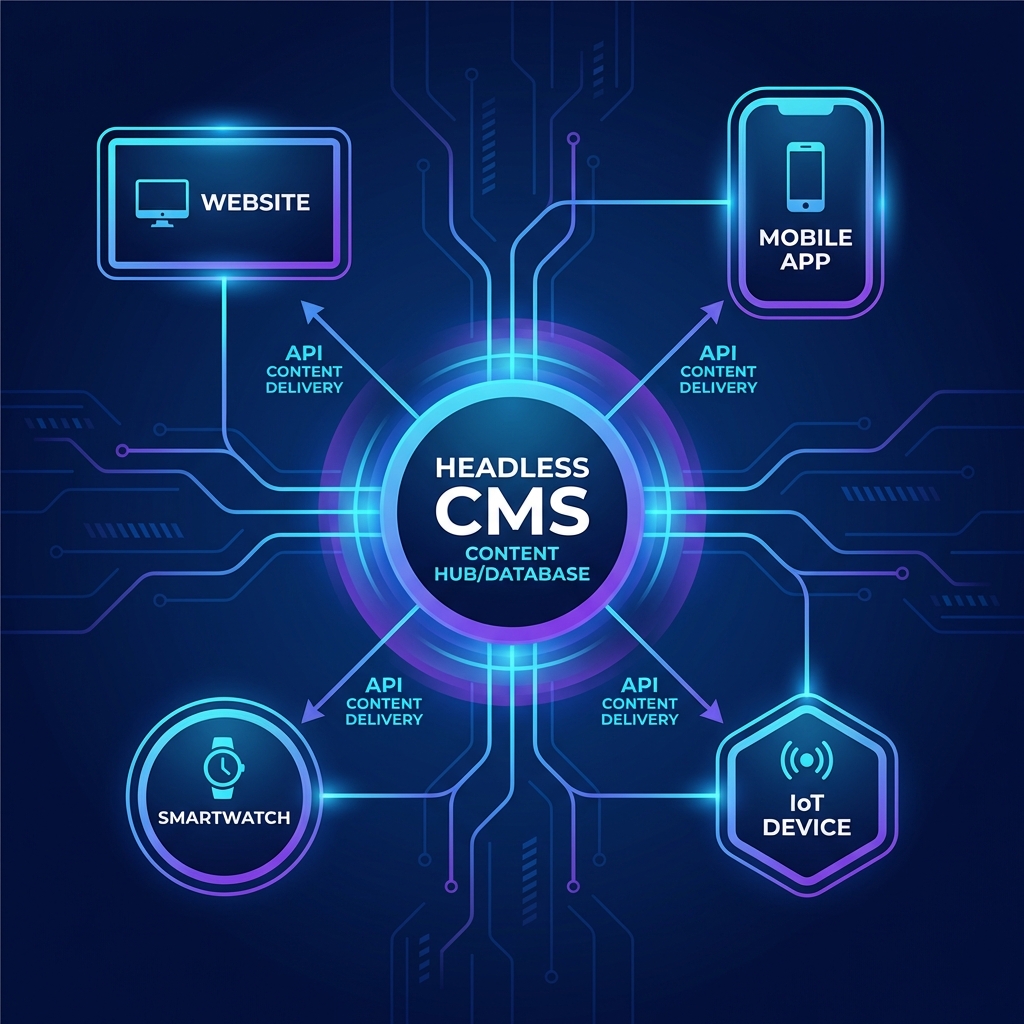
Headless CMS adalah sistem manajemen konten yang memisahkan “head” (frontend/presentation layer) dari “body” (backend/content repository). Konten dikelola melalui admin panel dan diakses via API, memberikan fleksibilitas untuk menampilkan konten di berbagai platform.
Arsitektur Traditional vs Headless
Traditional CMS (Coupled):
[Admin Panel] → [Database] → [Built-in Templates] → [Website]
Headless CMS (Decoupled):
[Admin Panel] → [Database] → [REST/GraphQL API] → [Website]
                                                 → [Mobile App]
                                                 → [Smart TV]
                                                 → [IoT Devices]
Keunggulan Headless CMS
| Aspek | Traditional CMS | Headless CMS |
|---|---|---|
| Flexibility | Terbatas pada platform | Multi-platform delivery |
| Performance | Bergantung pada tema | Optimal dengan SSG/SSR |
| Security | Rentan (exposed backend) | Lebih aman (API-only) |
| Scalability | Terbatas | Highly scalable |
| Developer Experience | Template-based | Modern stack friendly |
Platform Headless CMS Populer
1. Strapi (Open Source)
Strapi adalah Headless CMS open-source berbasis Node.js yang paling populer saat ini.
Kelebihan:
- ✅ 100% Open Source & Self-hosted
- ✅ Customizable content types
- ✅ Built-in REST & GraphQL API
- ✅ Role-based access control
- ✅ Plugin ecosystem
Kekurangan:
- ❌ Perlu hosting sendiri
- ❌ Maintenance responsibility
- ❌ Learning curve untuk customization
Ideal untuk:
- Tim dengan budget terbatas
- Proyek yang butuh full control
- Developer yang familiar dengan Node.js
Contoh Query GraphQL:
query {
  articles {
    data {
      id
      attributes {
        title
        content
        publishedAt
        author {
          data {
            attributes {
              name
            }
          }
        }
      }
    }
  }
}
2. Sanity

Sanity adalah platform konten yang powerful dengan real-time collaboration dan customizable studio.
Kelebihan:
- ✅ Real-time collaboration
- ✅ Portable Text (structured content)
- ✅ GROQ query language
- ✅ Image CDN dengan transformations
- ✅ Generous free tier
Kekurangan:
- ❌ Vendor lock-in
- ❌ Pricing bisa mahal untuk scale besar
- ❌ Learning curve untuk GROQ
Ideal untuk:
- Tim editorial yang kolaboratif
- Proyek dengan rich media content
- Startup yang butuh speed-to-market
Contoh Query GROQ:
const query = `*[_type == "post" && publishedAt < now()] | order(publishedAt desc) {
  _id,
  title,
  slug,
  "author": author->name,
  "categories": categories[]->title,
  mainImage {
    asset-> {
      url
    }
  }
}[0...10]`;
3. Contentful
Contentful adalah enterprise-grade Headless CMS dengan fokus pada scalability dan reliability.
Kelebihan:
- ✅ Enterprise-ready
- ✅ Excellent documentation
- ✅ Strong CDN performance
- ✅ Webhooks & integrations
- ✅ Content modeling yang fleksibel
Kekurangan:
- ❌ Expensive untuk small projects
- ❌ Limited customization
- ❌ Entry-based pricing
Ideal untuk:
- Enterprise dan corporate websites
- Multi-regional companies
- Tim dengan budget besar
4. Payload CMS
Payload adalah newcomer yang powerful, berbasis TypeScript dengan developer experience yang excellent.
Kelebihan:
- ✅ TypeScript-first
- ✅ Self-hosted & open source
- ✅ Built-in authentication
- ✅ Local file storage support
- ✅ Extensible dengan hooks
Kekurangan:
- ❌ Relatively new (smaller community)
- ❌ Fewer plugins
- ❌ Perlu hosting sendiri
Ideal untuk:
- TypeScript developers
- Proyek yang butuh custom authentication
- Developer yang suka modern tooling
Contoh Collection Config:
import { CollectionConfig } from 'payload/types';

export const Posts: CollectionConfig = {
  slug: 'posts',
  admin: {
    useAsTitle: 'title',
  },
  access: {
    read: () => true,
  },
  fields: [
    {
      name: 'title',
      type: 'text',
      required: true,
    },
    {
      name: 'content',
      type: 'richText',
    },
    {
      name: 'author',
      type: 'relationship',
      relationTo: 'users',
    },
    {
      name: 'publishedAt',
      type: 'date',
    },
  ],
};
Perbandingan Lengkap
| Fitur | Strapi | Sanity | Contentful | Payload |
|---|---|---|---|---|
| Pricing | Free (self-hosted) | Freemium | Paid | Free (self-hosted) |
| Hosting | Self-hosted | Cloud | Cloud | Self-hosted |
| API Type | REST + GraphQL | GROQ + GraphQL | REST + GraphQL | REST + GraphQL |
| Language | JavaScript | JavaScript | N/A (SaaS) | TypeScript |
| Learning Curve | Medium | Medium | Easy | Medium |
| Community | Large | Medium | Large | Growing |
| Best For | Flexibility | Collaboration | Enterprise | TypeScript devs |
Integrasi dengan Frontend Frameworks
Next.js + Sanity
// lib/sanity.ts
import { createClient } from '@sanity/client';

export const client = createClient({
  projectId: process.env.SANITY_PROJECT_ID,
  dataset: 'production',
  useCdn: true,
  apiVersion: '2025-01-01',
});

// app/blog/page.tsx
import { client } from '@/lib/sanity';

async function getPosts() {
  return client.fetch(`
    *[_type == "post"] | order(publishedAt desc) {
      _id,
      title,
      slug,
      excerpt
    }
  `);
}

export default async function BlogPage() {
  const posts = await getPosts();

  return (
    <div className="grid gap-6">
      {posts.map((post) => (
        <article key={post._id}>
          <h2>{post.title}</h2>
          <p>{post.excerpt}</p>
        </article>
      ))}
    </div>
  );
}
Astro + Strapi
---
// src/pages/blog/index.astro
const response = await fetch(`${import.meta.env.STRAPI_URL}/api/articles?populate=*`);
const { data: articles } = await response.json();
---

<html>
  <body>
    <h1>Blog</h1>
    <div class="grid">
      {articles.map((article) => (
        <article>
          <img src={article.attributes.cover.data.attributes.url} alt="" />
          <h2>{article.attributes.title}</h2>
          <p>{article.attributes.excerpt}</p>
        </article>
      ))}
    </div>
  </body>
</html>
Kapan Menggunakan Headless CMS?
✅ Gunakan Headless CMS Jika:
- Multi-platform delivery - Konten perlu ditampilkan di web, mobile app, dan platform lain
- Developer team yang modern - Tim familiar dengan React, Vue, atau framework modern
- Scalability penting - Antisipasi traffic tinggi dan growth
- Custom frontend needed - Design yang sangat custom dan interactive
- API-first approach - Arsitektur microservices atau JAMstack
❌ Pertimbangkan Traditional CMS Jika:
- Simple website - Blog atau company profile sederhana
- Non-technical editors - Tim konten tidak tech-savvy
- Budget terbatas - Tidak ada resource untuk development custom
- Time-to-market urgent - Perlu launch dalam hitungan hari
- Built-in features needed - E-commerce, SEO tools, dll.
Migration dari WordPress
Jika Anda ingin migrate dari WordPress ke Headless CMS, berikut langkahnya:
- Audit konten - Review semua post types dan taxonomies
- Pilih platform - Sesuaikan dengan kebutuhan dan budget
- Design content model - Map WordPress struktur ke Headless
- Export data - Gunakan WP REST API atau plugin export
- Import ke Headless CMS - Gunakan migration scripts
- Build frontend baru - Develop dengan framework modern
- Test thoroughly - Pastikan semua konten migrated correctly
- Setup redirects - Maintain SEO dengan proper redirects
Kesimpulan
Headless CMS adalah evolusi natural dalam content management yang memberikan flexibility, scalability, dan better developer experience. Namun, bukan berarti cocok untuk semua use case.
Key Takeaways:
- Strapi - Best for self-hosted, full control
- Sanity - Best for real-time collaboration
- Contentful - Best for enterprise
- Payload - Best for TypeScript developers
Pilih platform yang sesuai dengan kebutuhan tim, budget, dan technical requirements Anda.
Butuh Bantuan Implementasi?
Tim kami berpengalaman dalam implementasi Headless CMS dengan berbagai framework modern. Hubungi kami untuk konsultasi gratis!
Bagikan Artikel:
Artikel Terkait

Mengapa Laravel Adalah Pilihan Terbaik untuk Backend Development
Kenali keunggulan Laravel sebagai framework PHP modern yang powerful, elegant, dan memiliki komunitas yang besar.

WordPress vs Custom Development: Mana yang Lebih Baik?
Pertimbangan penting dalam memilih antara WordPress dan custom development untuk project website Anda.

10 Tips SEO untuk Meningkatkan Ranking Website Anda
Strategi SEO terbukti yang dapat meningkatkan visibility website Anda di mesin pencari Google dan mendatangkan traffic organik.